Sketchbook
- 4.1
- Rating
- 100.00M
- Installs
- Free
- Price

 Analysis by App-foxy
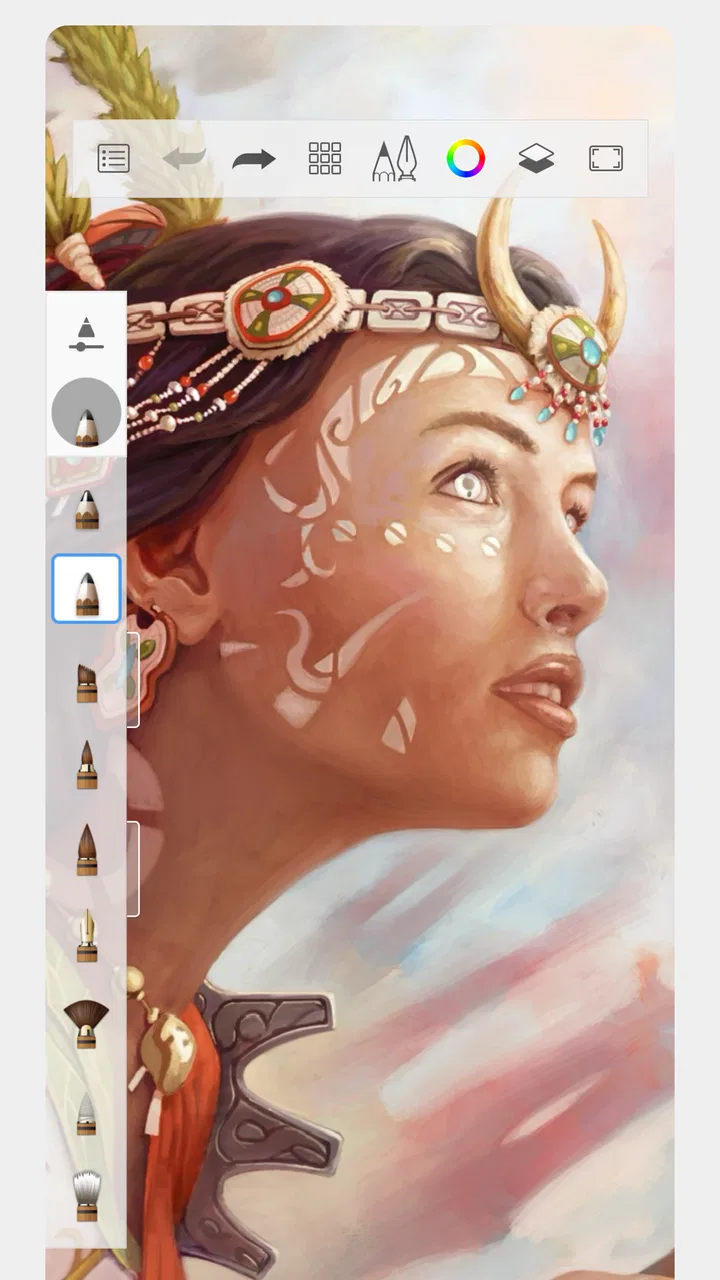
I keep coming back to Sketchbook when I want to draw without setting up a desk full of paper, pencils, and erasers. It is an art and design app from Sketchbook that turns a phone or tablet into a flexible digital sketchpad. The experience is deliberately familiar: I can make a quick outline, test colors, or spend longer refining an illustration, while keeping the whole process on one screen.
That simplicity is especially useful on a shared household device. One person can use it for a school diagram, another can make a birthday card, and someone else can experiment with digital painting. It does not feel tied to one narrow type of artist. My overall impression is that it is a capable free starting point for drawing, although people expecting a complete professional studio may eventually want a more specialized tool.
How Sketchbook fits into everyday drawing
The first thing I notice is that the app feels more like a blank workspace than a social platform or a guided lesson. There is no pressure to publish anything or follow a particular style. I can open a canvas and begin with a rough line, which makes it suitable for those moments when an idea appears unexpectedly.
In-Depth Coverage of Sketchbook
For a realistic household example, imagine using a tablet in the kitchen while planning a room makeover. I might sketch the wall, mark where shelves should go, and try different color combinations. Later, a child could use the same device to draw a character, while another family member uses it to annotate a rough garden layout. The value here is not just convenience; it is the ability to switch between practical and creative work without changing the basic workflow.
Sketchbook is free to install, and its content rating is Everyone, which makes it approachable for a broad range of users. That does not mean every drawing will be equally easy for every age group. Younger users may need help choosing tools and saving work, while older beginners may appreciate a short period of experimentation before the interface becomes comfortable.
The app has been available since October 8, 2014, and that long presence helps explain why it feels like an established drawing environment rather than a temporary novelty. Its developer is also named Sketchbook, so the product identity is unusually direct. I would describe it as a practical canvas first and an art playground second.
A workspace that rewards experimentation
My preferred way to use it is to begin with a loose sketch instead of trying to create a polished image immediately. Digital drawing can encourage endless correction, and that can make a simple idea feel strangely difficult. I get better results when I treat the first layer of marks as disposable planning rather than as the final artwork.
That approach also works well on a shared device because it lowers the barrier for the next person. A family member does not need to understand every option before making something useful. They can open a new canvas, test a brush, and learn through small actions. If the household has only one tablet, this kind of immediate access is more realistic than an app built around a long setup process.
One useful trade-off is that the freedom of a blank canvas can also feel slightly intimidating. A beginner who wants step-by-step drawing lessons may find the open-ended design less reassuring than a tutorial-focused app. I would choose Sketchbook for practice, planning, and personal projects, not as a substitute for a structured art course.
Setting boundaries on a shared tablet
When several people use the same device, the most important setup task is agreeing on where finished work belongs. I would create a simple household routine before anyone starts: use clearly named canvases, save important pieces in the device’s normal file system, and avoid treating the main drawing area as a permanent personal locker.
This matters because a drawing app can become messy quickly when sketches from different people accumulate without a naming habit. A child’s character study, a parent’s shopping diagram, and a student’s poster draft may all look similar in a thumbnail view. Names such as “Maya-character,” “kitchen-plan,” or “science-poster” make handoffs much easier.
I would also agree on a basic rule about editing another person’s work. Sketchbook makes experimentation inviting, but a shared canvas should not be changed casually if someone considers it finished. A separate copy is safer for trying a new color scheme or adding notes. This is less about the app enforcing boundaries and more about household coordination.
The free entry point is helpful when a family wants to try digital art without committing money immediately. There are in-app purchases priced at $2.99 per item, so I would check the purchasing setup on a shared device before letting younger users explore every option. The practical lesson is simple: decide who can approve purchases, and make that expectation clear before the first creative session.
Coordinating projects without getting in the way
Sketchbook works best for coordination when the project is visual and reasonably self-contained. I can draft a logo idea, mark up a furniture arrangement, or prepare a rough illustration for someone else to review. It is less suitable as a full project-management system because the drawing itself is the center of attention, not task assignment or group discussion.
For a household project, I would keep one canvas for the current version and make separate working copies for major experiments. That avoids the common problem of changing a successful composition and then wishing the earlier version had been preserved. It also lets a second person contribute without taking over the original.
You May Also Like

 AccuWeather: Weather Radar
AccuWeather Review: A Quick, Clear Forecast for Everyday Decisions
For everyday plans, the best forecast is the one you can understand quickly. AccuWeather makes rain timing, radar, and local conditions easy to act on, with a few trade-offs.

 Hill Climb Racing
Why Hill Climb Racing Still Turns Crashes Into One More Run
A tiny car, a bumpy hill and one more upgrade: Hill Climb Racing keeps resurfacing because its simple chaos makes every near-miss feel personal.

 AliExpress - Shopping App
AliExpress Makes Global Shopping Feel Personal, but Shoppers Bear the Risk
AliExpress turns a global marketplace into a pocket-sized discovery engine. Its reach is useful, its shopping loop compelling, and its trade-offs easy to miss.

 Lords Mobile: Kingdom Wars
Lords Mobile Is a Kingdom-Building Routine, Not a Quick Match
A case-by-case verdict on the building, battles, device demands, and social commitments that make Lords Mobile rewarding for some players and exhausting for others.

 PDF Scanner app - TapScanner
TapScanner Makes Paperwork Easier to Capture, Check, and Share
TapScanner makes scanning with a phone feel less like a rescue operation and more like a dependable step in getting work done. Its capture tools are useful, though not flawless.

 Block Blast!
Block Blast! Shows How Much a Puzzle Game Can Leave Out
A quiet grid game shows why puzzle players increasingly value instant clarity, repeatable skill and low-pressure play—and where the genre still needs to catch up.
More From Our News Desk
View All News


A useful workflow is to start with a rough planning pass, pause for another person’s input, and only then spend time on detail. For example, if two family members are designing a poster, they can agree on placement and proportions before anyone spends a long time coloring. This saves effort and makes the app feel more collaborative even when people are taking turns rather than drawing simultaneously.
I would not use it as the only place to keep an important household record. A drawing can be excellent for visual thinking, but a serious plan may still need a separate written note or a conventional document. Sketchbook is strongest when the image itself communicates the idea.
What the age rating means in real use
The Everyone rating makes sense for a general-purpose drawing tool. There is nothing about the basic activity that requires an adult audience, and the app can support harmless creative use across a wide age range. Still, age suitability and supervision are not identical. A younger child may need help with device navigation, saving, and understanding that a shared canvas belongs to someone else.
On a family tablet, I would give children a clear area or a predictable naming convention rather than assuming the app will organize everything for them. I would also explain that paid items are a household decision. That conversation is more useful than simply saying the app is free, because free installation and optional purchases are different parts of the experience.
Trust becomes important when older children or several adults use the same device. I would avoid opening someone else’s unfinished artwork without permission, and I would keep personal sketches in an appropriate location if the tablet is not private. These are ordinary shared-device habits, but they matter more in an app where the work can feel personal.
For school-age users, Sketchbook can be a good place to visualize ideas before writing them down. A student might sketch a diagram, map a story scene, or explore a presentation concept. I would still encourage them to keep the final school material in whatever format their teacher expects. The app helps with creation; it does not replace every part of submitting an assignment.
Useful techniques beyond the first sketch
One of my favorite habits is separating rough construction from the final drawing whenever the project becomes more involved. I can use an early pass to work out proportions and composition, then preserve that planning stage while refining the image. This makes experimentation feel safer and prevents every correction from becoming a destructive decision.
Another practical tip is to test a brush or color in an empty area before applying it to the main subject. On a small phone screen, a mark can look different from what I expected, especially when I am switching between a fingertip and a stylus. A few test strokes reduce the chance of damaging a carefully developed section.
I also find that zooming should be treated as a detail tool, not as the normal view for the entire session. Working too close can make lines look excellent while the overall image becomes unbalanced. I prefer alternating between close inspection and a wider view. That simple rhythm is particularly useful for portraits, lettering, and any drawing where proportions matter.
For shared use, I would add one more rule: finish a session with a quick cleanup. Rename the canvas, save the current state, and leave the workspace understandable for the next person. It takes very little time, but it prevents the next user from wondering which of several unnamed sketches is safe to edit.
Where it stands beside familiar alternatives
Compared with a basic phone notes app, Sketchbook is far more appropriate for actual drawing. Notes can handle a quick doodle, but they usually make visual experimentation feel secondary. Here, the canvas is the main event, so the app is better suited to repeated practice and illustration work.
Compared with a paper notebook, it offers cleaner correction and easier experimentation, but it loses some of the physical charm of paper. I do not get the same tactile resistance or the satisfaction of seeing a page fill up. For brainstorming in a café or during a family planning session, digital convenience wins; for relaxing away from screens, paper may still be the better choice.
Compared with a highly specialized professional art program, Sketchbook feels more approachable and less demanding to learn. That is a strength for beginners and shared devices. The trade-off is that an advanced artist may want deeper production features, a more extensive workflow, or tighter integration with a larger creative process. I would not choose this app simply because it is free if my work depends on a very specific professional pipeline.
Its average rating is 4.0 from around 698 thousand ratings, and the app has passed 100 million installs. Those figures suggest broad adoption, but they do not tell me whether it will suit a particular artist. In my view, its real advantage is the balance between immediate access and enough room to grow, not a promise that it replaces every other drawing tool.
Who should use it, and who should skip it
I would recommend Sketchbook to someone who wants a portable place for sketches, visual notes, simple illustrations, and regular drawing practice. It is also a sensible choice for households sharing a tablet, provided everyone agrees on file organization and purchase boundaries. Beginners can start casually, while more experienced users can use the blank canvas for faster planning.
I would be more cautious about recommending it to someone who wants guided lessons from the moment the app opens. The freedom is useful, but it does not automatically teach anatomy, perspective, color theory, or composition. A learner seeking a curriculum may be happier with a dedicated education app and use Sketchbook as the place to apply those lessons.
I would also suggest looking elsewhere if the main requirement is collaborative editing with several people working at the same time. Sketchbook can support turn-taking and visual handoffs, but that is different from a purpose-built team workspace. Likewise, someone who mainly needs typed household lists or formal documents should use a notes or productivity app instead.
Phone users should keep expectations realistic. A small display can handle quick sketches and annotations, but detailed work may feel cramped compared with a tablet. That is not a flaw in the drawing concept; it is a reminder that screen size changes the experience. If the app is being installed for a family, I would test it on the device that will actually be shared rather than judging it only on a larger screen.
My household verdict
After using Sketchbook as both a personal sketchpad and a possible shared-device tool, I see it as a strong all-rounder for informal digital art. It gives a household one place to explore drawing without demanding that every user be an artist. The free installation makes trying it easy, while the optional $2.99 purchases mean adults should establish a clear approval habit before children use the device independently.
The best results come from treating the app as a creative workspace with simple household rules: name canvases, protect finished work, save important pieces carefully, and use copies for experiments. Those habits solve most of the friction I experienced. They also make it easier for different ages and skill levels to share one tablet without stepping on each other’s projects.
My final recommendation is positive, with a clear boundary. Choose it if you want flexible sketching, painting, planning, or illustration in an approachable format. Skip it if you need formal document tools, a complete art curriculum, or a specialized professional production environment. For a family looking for an easy way to draw together or take turns creating, Sketchbook is at its best when freedom is paired with a little organization.
That combination is why I would keep it installed. It is quick enough for a five-minute idea, capable enough for a longer personal project, and open enough for different people in the same home to make the app their own. The experience is not perfect for every drawing need, but it is genuinely useful when the goal is to put a flexible digital canvas within easy reach.
FAQs for Sketchbook
01What platforms is Sketchbook available on?
Sketchbook is available on both Android and iOS platforms, making it accessible for a wide range of mobile users. Additionally, it can be used on tablets and desktops, allowing for seamless integration across devices. This flexibility ensures that users can sketch anytime, anywhere, without being restricted to a single device.
02Is Sketchbook suitable for professional artists?
Yes, Sketchbook offers a comprehensive set of tools that cater to both beginners and professional artists. It includes features like customizable brushes, layers, and advanced drawing tools. The app is designed to simulate a real sketchbook experience, providing artists with the flexibility and precision needed for professional work.
03Does Sketchbook require an internet connection to function?
No, Sketchbook does not require an internet connection for its core drawing functions. Users can sketch offline seamlessly. However, an internet connection might be necessary for cloud-based features, updates, or accessing community-shared content. This offline capability is ideal for artists who want to work without interruption.
04Are there any in-app purchases in Sketchbook?
Sketchbook offers a free version with a robust set of features, but there are also in-app purchases available for those who want to unlock additional tools and capabilities. These purchases enhance the user experience by providing access to premium brushes and advanced functionalities that cater to more specialized artistic needs.
05How user-friendly is Sketchbook for beginners?
Sketchbook is designed with an intuitive interface that is user-friendly for beginners. It includes tutorials and tips to help new users get started with digital sketching. The app’s layout is straightforward, allowing users to focus on creativity rather than navigation, making it a great choice for those new to digital art.
Pros
- User-friendly interface for beginners.
- Extensive brush customization options.
- Seamless layer management.
- Cross-platform compatibility.
- Offline access available.
Cons
- Limited text editing features.
- Occasional performance lag on older devices.
- No direct social media sharing.
- Paid features in the free version.
- Lacks 3D model support.

Sketchbook
Gallery